
All-in-One Video Downloader to Download Streaming Video from Websites
VidiKeep Streaming Video Downloader provides dedicated movie and TV show downloading solutions for each major streaming service. Enjoy seamless high-speed conversion with tailored support for every platform's unique encoding. You can build your offline video library in stunning 1080P quality and enjoy limitless playback anytime, anywhere.

Netflix Video Downloader
- Download Netflix videos to 1080p at 7X speed.
- Batch download Netflix files to MP4/MKV.
- Preserve multilingual audio and subtitles.
- Keep Netflix movies/shows forever without ads.

Amazon Prime Video Downloader
- Download Prime videos in up to 1080p resolution.
- Convert Prime movies and TV shows to MP4/MKV.
- Save entire seasons of a show at once at 8X speed.
- Preserve audio tracks/subtitles in various languages.

Disney Plus Video Downloader
- Download Disney+ movies/TV shows in 720p quality.
- Convert Disney originals and videos to MP4/MKV.
- Keep EAC3 5.1 surround and Dolby Atmos audio tracks.
- Watch Disney Plus videos offline with ads anywhere.

Apple TV Video Downloader
- Download 1080p Apple TV videos and MLS highlights.
- Convert Apple TV movies and shows to MP4/MKV.
- Download entire Apple TV seasons of a series.
- View Apple TV offline outside of Apple ecosystem.

HBO Max Video Downloader
- Download unlimited HBO Max videos at 16X speed.
- Convert HBO Max videos to MP4/MKV in batch.
- Remove ads at the pre-roll and in the mid-roll.
- Store Max movies and TV shows offline permanently.

Hulu Video Downloader
- Download ad-free Hulu content in 720 quality.
- Convert Hulu movies and TV shows to MP4/MKV.
- Preserve high-fidelity EAC3 5.1 surround sound audio.
- Play Hulu videos on any device without a subscription.
Unlock, Download, and Own Your High-quality Streaming Video World
Batch Download All Streaming Video on Mac/PC at Once
Stop waiting around for single files to process. While Netflix offers limited batch downloading, most official video streaming apps lack a 'one-click' feature for entire seasons or multiple shows. VidiKeep Stream Video Downloader features the advanced batch downloading engine, allowing you to download entire TV show seasons or complete movie franchises with a single click. Simply select what you want, hit download, and let the software process multiple streaming videos simultaneously on your macOS and Windows computers and laptops, saving you hours of time.
Download Streaming Movies and TV Shows to MP4/MKV
While many streaming platforms allow you to download videos for offline playback, they are limited to authorized devices only. With the help of VidiKeep Streaming Movie/TV Show Downloader, you can easily break free from restrictive, platform-specific playback apps. It can convert and download movies and TV shows from streaming services, like Netflix, Disney Plus+, Amazon Prime Video, Apple TV, and more into universally recognized MP4 or MKV formats. You guarantee flawless playback across all your devices without ever worrying about format incompatibility.
Preserve Every Frame in Stunning 1080P Clarity
Watching a beautifully shot series shouldn't mean sacrificing visual fidelity just because you are disconnected from the web. This best streaming video downloader ensures you retain up to 1080P and even 4K resolution while downloading streaming media from OTT sites. You can experience every frame and detail exactly as the creators intended, directly on your own screen without buffering.


Multi-Language Support for Subtitles/Audio Tracks

Preserve the full cinematic experience. Audio tracks and subtitles are the soul of storytelling. VidiKeep Video Downloader for Streaming Videos automatically detects and captures multiple audio streams and subtitles in every available language. Before you hit download, you have total control: choose your preferred languages and decide between seamless embedded subtitles or flexible independent SRT files to match your viewing style.
High-Quality Surround Sound (Dolby Atmos)

Theater-level audio at your fingertips. Don't let offline viewing compromise your soundstage. VidiKeep All-In-One Streaming Video Downloader is engineered to preserve the full sonic metadata of your favorite films and TV shows. From the bone-shaking bass of EAC3 5.1 to the multidimensional height of Dolby Atmos, our video downloader ensures every note and sound effect is captured with bit-perfect accuracy.

Pure Freedom: Ad-Free, Permanent & Universal Offline Playback
Take full command of your digital video entertainment. Why let streaming platforms dictate when or how you watch? VidiKeep Streaming Video Ripper empowers you to bypass all viewing restrictions and save a truly permanent digital library. You can freely transfer your streaming video downloads to smartphones, gaming consoles, smart TVs, or USB drives for instant offline playback or watching with others simultaneously later. Once downloaded videos from streaming sites, the content is yours to keep forever: No expiration dates, no ad interruptions, and no dependence on an internet connection. View your streaming media entirely on your own terms.

Ad-Free Viewing
Say goodbye to mid-roll ads and sponsored breaks. VidiKeep strips away all advertising while ripping a stream video, even if you're on a budget ad-supported streaming plan.

No Time Limits
Unlike official apps where downloads vanish after 48 hours or 30 days, your VidiKeep files are yours to keep. There are no "time limits" and no "content removed" warnings anymore.

Zero Region Restrictions
Travel the world without losing your watchlist. By converting streaming content to MP4/MKV, you bypass geo-fencing and regional blocks. Watch everything on the globe, even without a VPN.

Playback Without Active Plans
Take the pressure off your monthly budget. Once you download your movies and shows, you can play them back offline even if you choose to pause or cancel your streaming subscription.
Powerful Features That Make Streaming Video Downloading Easier Than Ever

Smart Duplicate Skip
Download entire Netflix seasons in bulk and customize settings for video quality, format, and subtitles.

Adjustable Video Quality
Choose from Low, Medium, or High outputs and customize bitrates to fit your device's capacity.

Flexible Encoding Options
Select between H.264 or AV1 video codecs to optimize file size while retaining video quality.

Built-in Web Player
Smart streaming link downloader to browse and download videos directly within the software.

Preserved Original Metadata
Keep cast lists, episode titles, and high-resolution cover art to organize your offline library easily.

Queue Management
Add multiple videos to the download queue, and pause/resume the download process at any time.
How to Download Any Streaming Video with VidiKeep
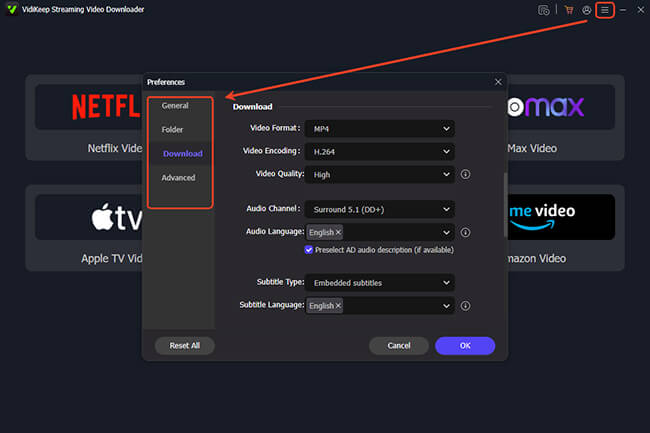
Customize the Streaming Video Output Settings
Here, you can customize the output video quality, video format, subtitles, audio quality, and more for video downloads.
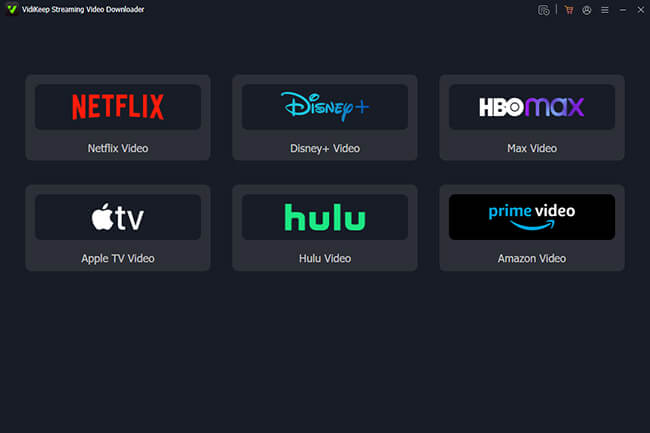
Select the Target Streaming Video Service
Install and launch the VidiKeep Streaming Video Downloader and select the target platform on which you'd like to download streaming videos. Authorize your account.
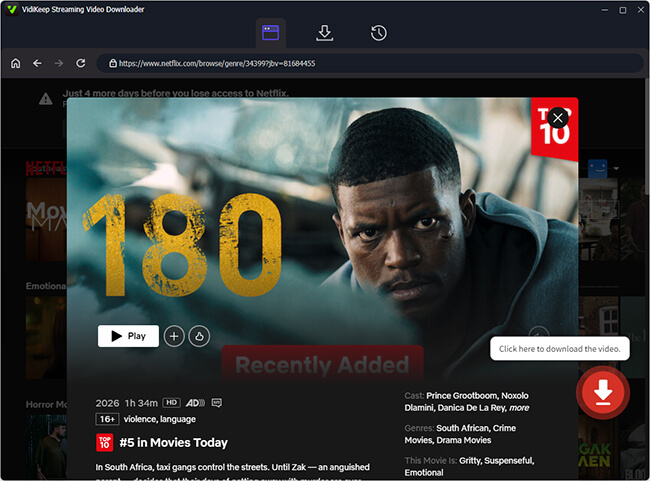
Search and Add Movie/TV Shows to Download
Browse your streaming video library and tap the item. Click the "Download" icon to add it and select the series or seasons that you'd like to download.
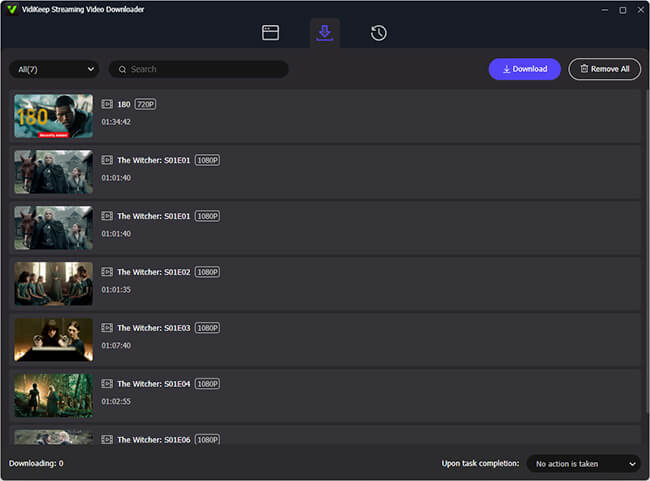
Download Videos from Streaming Sties
Hit the "Download" button to start the download process. You can add more videos to download or wait for the conversion to finish.
What Experts and Users Are Saying





Ethan Maxwell


Clara Sinclair

Felix Sterling

Iris Fairchild

Jasper Thorne
Countries and Regions
Satisfied Users
Downloads Worldwide
Updates/Year
Frequently Asked Questions
What Are the Differences Between Free Trial and Full Versions?
The Free Trial version is designed to let you test the software's compatibility and speed on your specific system. It allows you to download the first three minutes of each video to ensure the output quality meets your standards. The Full Version removes all length limitations, unlocking unlimited high-speed downloads for entire movies and full TV seasons.
What Streaming Services Can You Use to Download Movies on a Laptop?
While many streaming services offer official apps for mobile devices, most do not provide a native download feature for laptops (Mac or PC) through a web browser. With VidiKeep, you can bypass these browser limitations and download high-quality content directly to your laptop's hard drive.
What Streaming Services Let You Download Movies/Shows with VidiKeep?
VidiKeep is an all-in-one solution that supports a vast range of premium platforms. Specifically, it offers dedicated, high-speed downloading for these six major services, including Netflix, Amazon Prime Video, Disney+, Hulu, HBO Max, and Apple TV.
Can VidiKeep Remove Ads While Downloading Streaming Videos Online?
Yes. One of VidiKeep's most powerful features is its ability to provide an ad-free viewing experience. Even if you are subscribed to an ad-supported streaming plan, VidiKeep intelligently identifies and strips away all mid-roll ads and sponsored breaks during the download process.
Can I Transfer Video Downloads to iPhone, iPad, and Android Devices?
Yes. Because VidiKeep saves your streaming videos in MP4 or MKV, the files are not locked to the software. You can easily transfer your downloads via USB, cloud storage, or cable to your iPhone, iPad, Android phone, or tablet.
Is It Safe and Legal to Use VidiKeep to Download from Streaming Sites?
VidiKeep is 100% safe to use; our software is free of bundled malware, viruses, or intrusive advertisements. Regarding legality, VidiKeep is intended for personal, fair-use purposes only. It allows users to create offline backups of content they already have legal access to via their subscriptions. Don’t share or commercially distribute the downloaded files.

 VidiKeep Streaming Video Downloader
Smart Downloading, Your Content, Unlocked.
Download ad-free movies and TV shows from Netflix, Disney+, Amazon Prime Video, Apple TV, Hulu, and HBO Max to MP4 or MKV with zero quality loss. Break the boundaries of streaming, giving you the freedom to watch your library offline on any device, anywhere.
 System Requirements:
Windows 7/8/10/11. Mac OS X 10.13 to macOS 26.
 Rating:
4.9 / 5.0


 Pricing:
Starting at $59.95
 Supported Formats:
MP4 or MKV