



Netflix is undoubtedly the pioneer leader in the streaming market, boasting over 325 million paid subscribers worldwide. With its excellent catalog of various movies, TV shows, and original content, Netflix has received popularity and acclaim around the world. However, many users may not have used Netflix yet and are not sure if it is worth the price. In such a case, a free trial can be the best choice. Does Netflix have a free trial? How can you get a Netflix free trial? If you are curious about these questions, you are in the right place. In this comprehensive guidance, we will break down the current state of Netflix trials in 2026 and explore the best ways to help you ensure you never lose access to your favorite content.
Part 1. Does Netflix Have a Free Trial?
For Netflix beginners, the core question is, does Netflix have a free trial? Let’s be clear: no. As of 2026, Netflix does not offer an official free trial. Several years ago, Netflix discontinued its original 30-day free trial.
If you want to browse and watch the Netflix library, you must subscribe to one of its official plans. All Netflix subscriptions can be canceled at any time without extra fees. So, you can simply sign up for one month. If you think it’s not worthy, just cancel it.
Note
After canceling your Netflix plan, you will lose all your downloaded Netflix videos. If you want to keep your Netflix downloads after canceling, you can jump to Part 3 to learn the best method.
For users who truly seeking a $0.00 price tag, the Netflix account sharing feature can be used. Netflix has one account sharing feature, allowing users to share their Netflix account with others, though Netflix has implemented policies to regulate this feature more strictly in recent years. One Netflix subscriber can add up to 5 members to their plan. Thus, you can share your friends’ or family’s Netflix account as long as you live together in a household. If not, you need to pay $7.99 per month to get an extra member slot. Try to find an account owner who has an extra member slot, so they can add you to their account.
Part 2. How to Get Free Netflix Trial via Bundle Promotion
It is a pity that Netflix does not have an official free trial. However, you can still get a Netflix subscription for free via some service bundles provided by Netflix’s corporate partners. Several major mobile carriers and internet service providers currently bundle streaming services into their plans.
Option 1. Netflix T-Mobile Bundle

Although there is no official Netflix free trial you can get directly, you can still technically get free Netflix services via other means. One available option is the Netflix on Us benefit from T-Mobile. This benefit offers eligible T-Mobile customers a free Netflix subscription as a part of their mobile plan. Thus, you can enjoy Netflix service without having to pay separately as long as you subscribe to certain T-Mobile plans, such as Magenta, Magenta Max, and most Go5G plans.
In addition, it is convenient since customers can manage their Netflix subscription directly through T-Mobile, and it’s included in the overall mobile bill. This is a long-running freebie and it’s still available currently. But you should know that it was officially downgraded in January 2024. Now, you can only get Netflix’s ad-supported membership with the mobile plan. If you want a higher-tier Netflix plan, you can apply the T-Mobile credit toward that and pay the difference. For more detailed information, please visit the T-Mobile’s website.
Option 2. Netflix Verizon Bundle
Another feasible choice for you to get a free Netflix subscription is the entertainment package of Verizon. Verizon does not provide free Netflix plans, but the Netflix subscription is often included in various promotions or services bundled on Verizon’s +play platform. By combining Netflix with other streaming services, you can find discounts or special deals.
For example, you can find a Verizon perk named “Netflix & Max”, which costs $10 per month. It provides access to both Netflix and Max streaming services. Another available option is the Verizon annual subscription. Once you purchase an annual plan on +play, you will receive 12 months of Netflix Premium without additional cost. Whether you currently have a Netflix subscription or not, you are eligible to purchase it.
Option 3. Netflix Xfinity Bundle
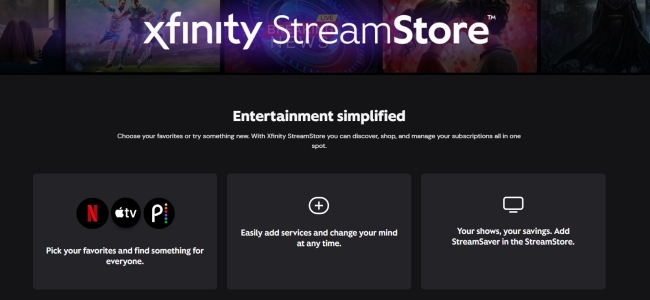
If you are a customer of Comcast Internet, you can also have free access to Netflix through its Xfinity StreamSaver bundle. Xfinity offers promotional bundles that include Netflix Standard with ads as part of a combined service deal. Through this bundle, you can stream Netflix content without paying for Netflix as a separate subscription, as the cost is rolled into a significantly discounted package. Plus, there are other popular services included, like Apple TV+ and Peacock Premium.
As long as you have an active Xfinity Internet plan and live in a supported service area, you can enroll in a qualifying bundle. However, you should notice that promotions change frequently, it’s always a good idea to check your local Xfinity page or contact customer support.
Part 3. Ultimate Strategy: How to Make the Most of Your Netflix Plan
Although Netflix does not offer an official trial, you can get a free Netflix subscription via some bundle plans. If you are seeking ways to save money on your Netflix plan, maybe you can try to back up your favorite Netflix videos by downloading them as local files before your subscription expires. As a result, you can save your favorite Netflix videos on your local computer permanently instead of paying for Netflix continuously. But to do so, you will need to remove the DRM protection of Netflix first. Tunelf Netflix Video Downloader is the most ideal tool to give you such assistance.
Tunelf Netflix Video Downloader is a professional downloader designed for all Netflix users, helping you download all your favorite TV shows and movies from Netflix to your computer as local files. You can set the video format as MP4 or MKV depending on your needs. After downloading, feel free to watch the Netflix downloads at any time. You can even transfer them to other players and devices for offline watching. The Tunelf software smartly retains the ID3 tags and multi-language audio tracks to ensure your experience. You can even decide on diverse video output settings, including video quality, video encoding, audio channel, audio language, and subtitle type. Now, download the Tunelf software on your computer and get whatever you like from Netflix before your subscription expires.
Key Features of Tunelf Netflix Video Downloader
- Download TV shows, movies, anime, and various content on Netflix
- Convert Netflix to MP4 and MKV while keeping the original quality
- Support exporting Netflix content to videos, audio, and subtitles
- Allow to choose multilingual subtitles and soundtrack for Netflix
- Offer an abundant of features like automatic task completion
Step 1 Load Netflix on the interface of the Tunelf software
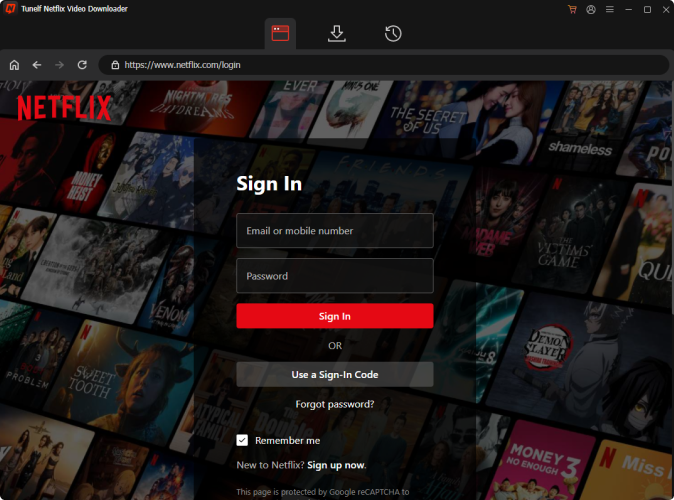
Tunelf Netflix Videos Downloader prepares Windows and Mac versions for different users. You can click the Download button above to get the right version installed on your computer. Then, launch it. Thanks to the built-in Netflix website, you don’t need to download the Netflix app anymore. Now, you only need to click the Sign In option and you can sign in to your Netflix account.
Step 2 Customize Netflix video output settings
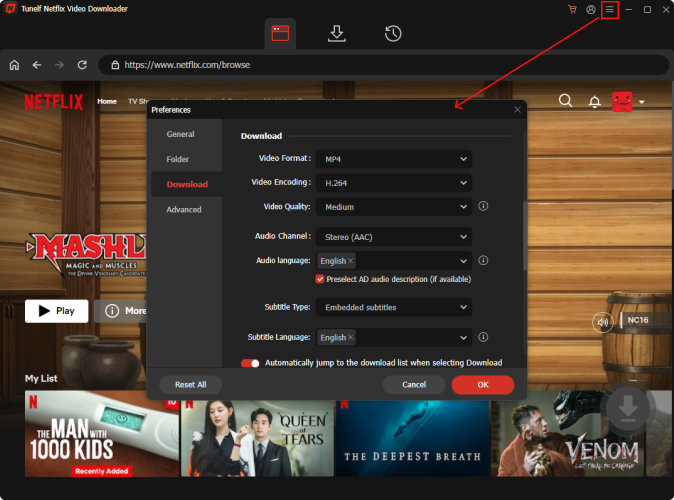
Click the menu icon at the top right, and then choose Preferences. Here you should choose one video format you need. Also, set other video, audio, and subtitle settings according to your demands. When it is finished, you need to click OK to make a confirmation.
Step 3 Find target Netflix videos to download
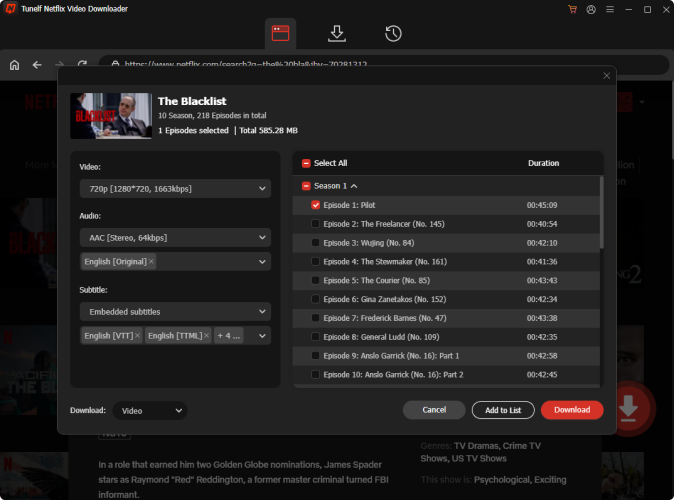
Next, you can browse different videos on Netflix’s home page or use the search feature to find the target video you want to download. Then, select it and click the red download icon in the lower right corner. The Tunelf software will begin analyzing it automatically. Wait for a few seconds, and you can set some advanced settings if it prompts. When you select one TV show, you need to pick the episodes as well.
Step 4 Download your favorite Netflix videos for backup
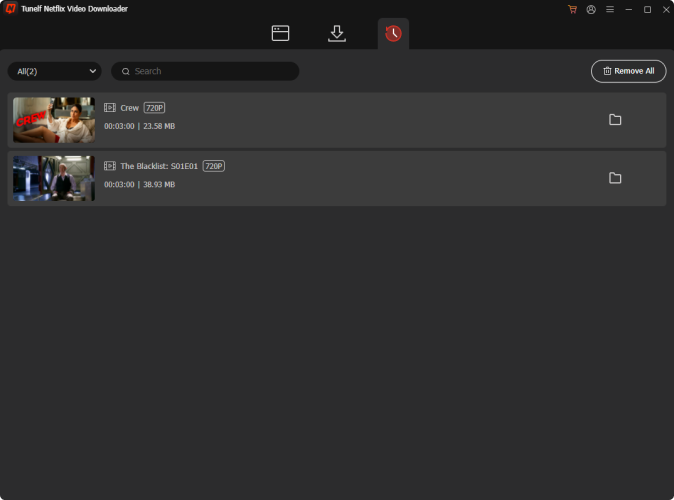
Now you can download the videos you choose. All you need is one simple click on the Download button. Then, wait for a while and you can check the downloaded Netflix videos in the History section. In the window, you will also see one Add to List option, which is prepared for users who need to download multiple videos in batches. Whenever you need to download many videos at once, you can click it, and then head to the Download List section to finish the downloading process.
Part 4. Conclusion
Does Netflix have a free trial? Unfortunately, no. But no worries, you can still find alternative methods in this post. By paying for some media bundle plans, it’s possible for you to get a time-limited Netflix subscription for free. If you are looking for the best method to save on Netflix costs, you should consider downloading your favorite videos locally before your subscription expires. To do so, Tunelf Netflix Video Downloader is your best choice.
Get the product now:
Get the product now:


